Booking without an account
The customer picks a service, a day and a time, fills in a name and an email, and that is it. No sign-up, no password — every extra step loses part of the people.
Booking system
A regular booking grid offers a slot every half hour. Between two customers that leaves windows too short for another service — and over a day they add up to an hour nobody pays for. StickyCal offers the next slot so that it sticks to the previous one.
30 days free. No card, no installation, cancel any time.
Slots are not laid out on a fixed grid; they stick to what is already in the calendar — hence the name. The engine knows the length of the service, the setup and cleanup around it, lunch breaks, holidays and time off — and offers only times that can actually be worked. A short window at the end of the day is offered as a tail slot so it does not stay empty.
Same day, same staff, same price list. The grid drops two 15-minute pieces — shorter than the shortest service you offer, so nobody can book them. On the right they add up to one more customer.
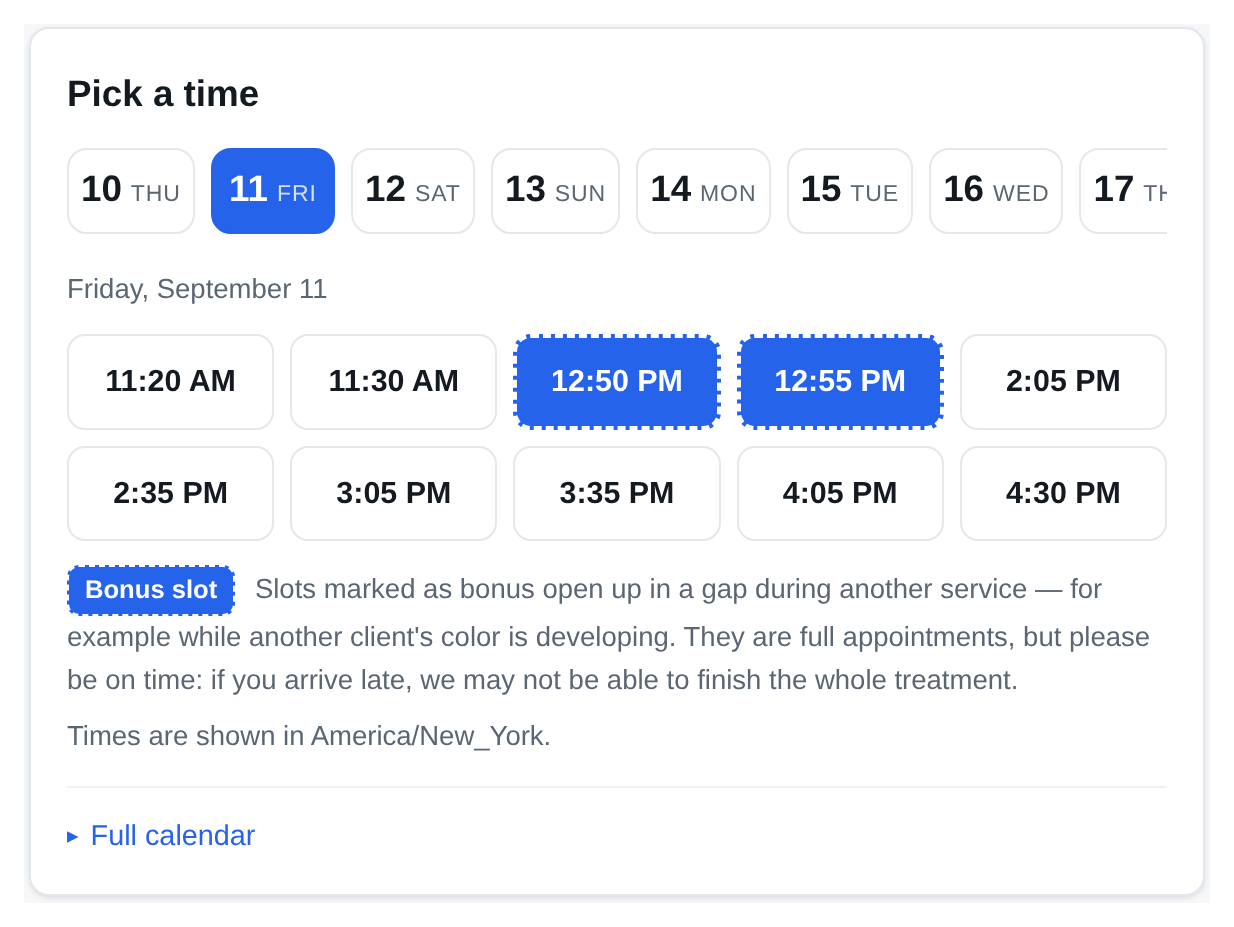
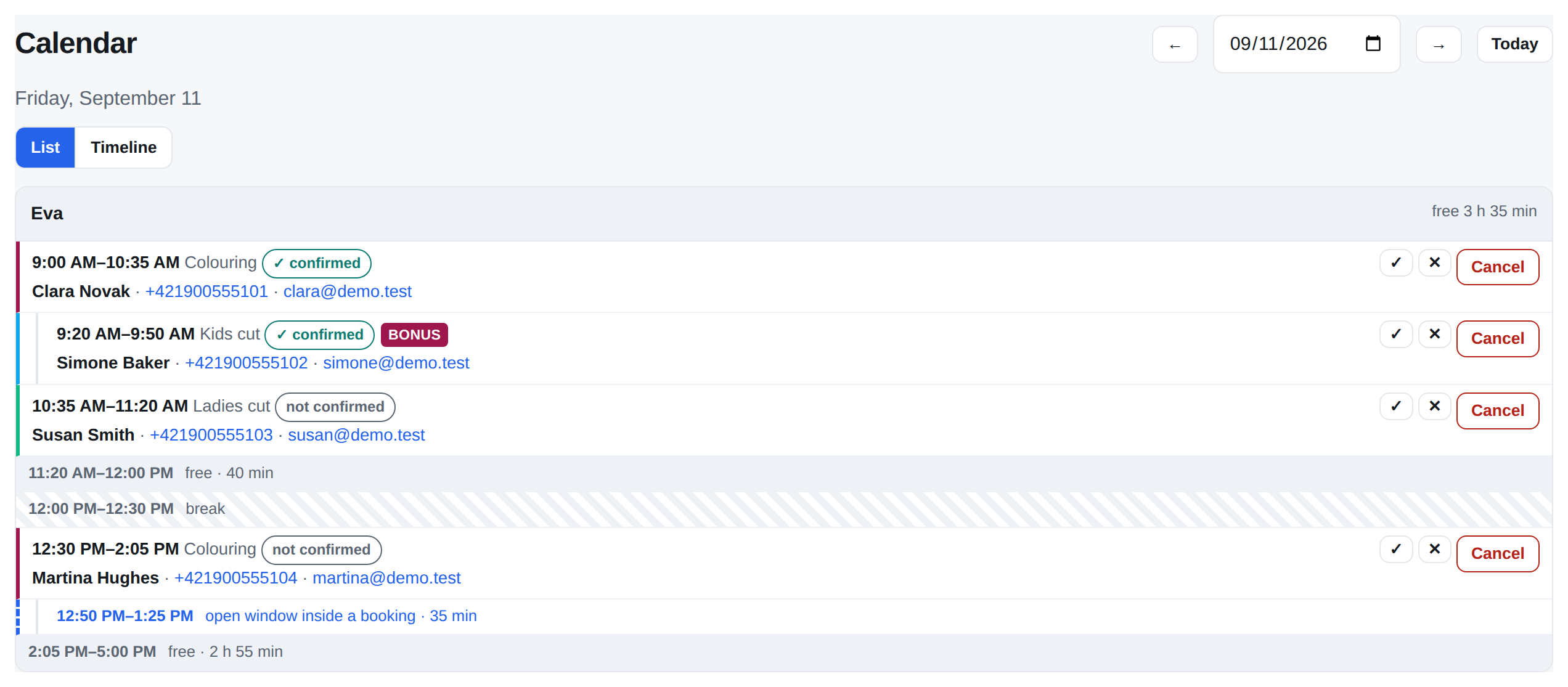
A colour takes 95 minutes, but the stylist is free for 45 of them — while the colour develops, the client just sits. StickyCal offers that time as a bonus slot, and a short cut for a child fits right into it. It is the one gap no calendar shows you, because it happens inside a booking.
Turn on what you need. Leave the rest off — your calendar stays easy to read.
The customer picks a service, a day and a time, fills in a name and an email, and that is it. No sign-up, no password — every extra step loses part of the people.
While the colour develops or the lab runs the numbers, the staff member is free — and that time can be sold. StickyCal offers it as a booking of its own inside an existing one.
A weekly schedule per calendar, several blocks a day, lunch breaks, public holidays, time off as a range of days, and one-off blocks.
Recurring sessions with a capacity — yoga, training, driving lessons. Sessions are generated ahead and the database itself guards the seats, so the capacity holds even under concurrency.
For a class the freed seat goes to the first in line and is held until they confirm. For a one-to-one slot the business gets the waiting list with phone numbers and gets in touch itself — a call beats an email when the slot frees up for tomorrow. Automatic emails can be switched on.
A confirmation e-mail right after booking. The reminder goes out in the morning of the last working day before the appointment — whoever cancels frees the slot while there is still time to offer it to someone else. One click lets the client confirm they are coming, or cancel. Templates are ready in every language StickyCal speaks and can be rewritten.
Email carries the detail, SMS is what the customer actually sees. Credit is counted in segments, so you see the price of the text as you type it. When the credit runs out the message is not dropped — it goes out by email.
Both ways: bookings land in the staff calendar and their own events block the time. If you would rather not connect accounts, there is a subscription link (iCal).
Two lines of code and the booking form runs on your own site. The frame sets its own height, so nothing gets cut off on a phone either.
Ask whatever you need — hair length, licence plate, date of birth, consent to terms. Text, choice, date, checkbox; globally or for a single service. Answers show up in the calendar and in the export.
A coupon is a rule (percentage or amount, validity, usage limits), a gift card is money with a balance to draw down. A cancelled booking returns both.
A bundle of visits counted in visits, not in money — ten lessons stay ten even after a price rise. A cancelled booking returns the visit.
With Stripe Connect the money goes straight to your account; StickyCal never holds it. Full payment or a deposit, refunds in one click.
One account, several places. The customer picks the location first and then sees only its calendars and services.
A booking is a bar, free time is the space between — you see at a glance where someone still fits. A list has no scale: a five-minute gap looks the same size as a three-hour one.
Revenue, calendar utilisation, no-shows, most-booked services, distribution over time. The Excel export handles accents and phone numbers correctly in any country; CSV stays for anyone pulling the data elsewhere.
A key with read-only or write access, signed outgoing webhooks, and a verified custom domain instead of a slug in the address.
Anywhere people book time with a particular person, chair or machine. You don't have to be a salon — the rest works the same.
Not on the list? If people come to you by appointment, StickyCal will fit. Try it and tell us what's missing.
Every plan starts with 30 days free. Billed monthly or yearly, cancel any time.
9,00 € / month
or 99,00 € a year
29,00 € / month
or 299,00 € a year
49,00 € / month
or 499,00 € a year
Prices exclude VAT. SMS is topped up separately — a monthly allowance is included, anything above it is bought in packs.